你好
我希望移动机器人能够根据外部 Excel 调度表执行运输任务,该调度表包含时间戳、起点和目的地。(见下表)

image629×120 2.49 KB
到目前为止,我知道可能有两种方法,但不确定是否可行:
-
供料表(CSV)
将 Excel 调度表转换为供料 CSV 文件。
每个起点-目的地对都需要一个单独的产品类型和流程流,在我们的案例中这将导致大约 2,000 个产品/流程设置 —— 这种方法不切实际。
-
Excel 读取器 + 产品属性路由
使用 Excel 读取器加载路由数据,将这些值写入产品属性,并让下游流程使用产品属性过滤器来路由产品。
这对于路由有效,但似乎无法基于 Excel 文件中的时间戳触发产品释放。
我想就上述方法征求您的帮助/建议,或者是否有其他解决方案,谢谢。
Tilma 2026年1月27日 下午1:102
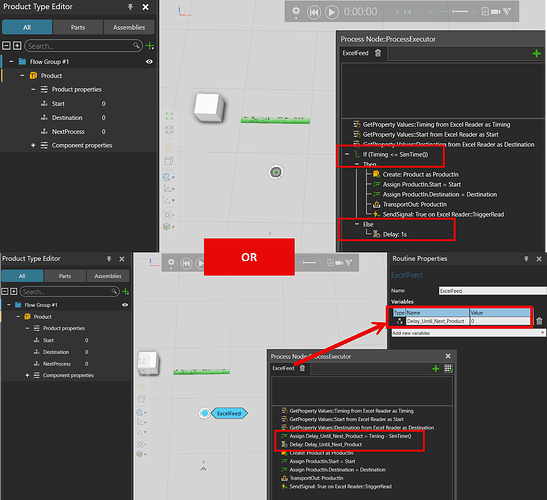
你好,对于第二种方法,使用 Excel 读取器,你可以使用“SimTime()”获取实际时间,并等待直到需要创建新产品的时间。
一种解决方案是使用 If 循环,在其中检查“Timing <= SimTime()”。如果是,则创建产品,如果不是,例如等待 1 秒。
另一种解决方案是向流程添加一个实数属性,以计算创建新产品之前剩余的时间 –> Delay = Timing - SimTime()。然后使用一个延迟语句,并将此属性用作表达式。
grafik1370×1252 201 KB
Tilma 2026年1月27日 下午1:133
你也可以尝试这个插件,它允许你在流程中直接读取 Excel 文件:VariablesCache + TransportPatternIn 助手
Gene 2026年1月28日 上午4:004
你好 Tilma
你能分享这个布局吗?不确定产品中的 NextProcess 和流程节点中的 SendSignal 需要什么。
Tilma 2026年1月28日 上午7:575
你好,
我没有保存这个布局……
产品属性 NextProcess 只是一个测试,目的是使用 TransportIn 中的属性过滤器将产品运输到正确的机器流程(NextProcess 在开始时为“Start”,在处理一次后为“Destination”)。也可以使用 GetFlowStep + SetNextFlowStep 语句来调整每个产品的流程。
语句 SendSignal 与 ExcelReader 一起使用,通过触发信号“TriggerRead”来读取表格的下一行。
Gene 2026年1月28日 上午9:006
你好 Tilma
当我尝试复现你的布局时,过滤器中显示了这个错误。你知道是为什么吗?
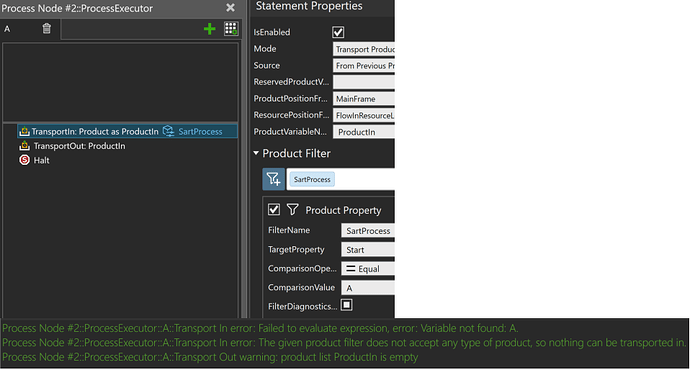
image958×514 75.2 KB
Excel Read Test.xlsx(8.7 KB)
Excel Reader Test.vcmx(275.9 KB)
Tilma 2026年1月28日 上午9:127
属性 Start 是一个字符串,所以在 ComparisonValue 中你需要写 “A” 而不仅仅是 A。
Gene 2026年1月29日 上午7:199
你好 Tilma
我还想记录真实的机器人拾取时间和产品到达时间,并导出到 Excel,以便查看延迟情况。你知道怎么做吗?谢谢。


 微信扫一扫,打赏作者吧~
网友评论
最新评论