网淘吧Visual Components、Flexsim 仿真技术博客 | Python、C#、Delphi xe 机器人编程教程 - 网淘吧

Tutorial Task 2.2 - Build an Output Collector

2026-05-21 新闻来源:网淘吧 围观:3
电脑广告
手机广告

任务概述

在本教程中,您将创建一个用于记录各站点输出数据的统计收集器。本教程基于本系列教程一中使用的同一模型。关于如何加载模型的信息,请参考该教程:

教程 2.1 - 步骤 1

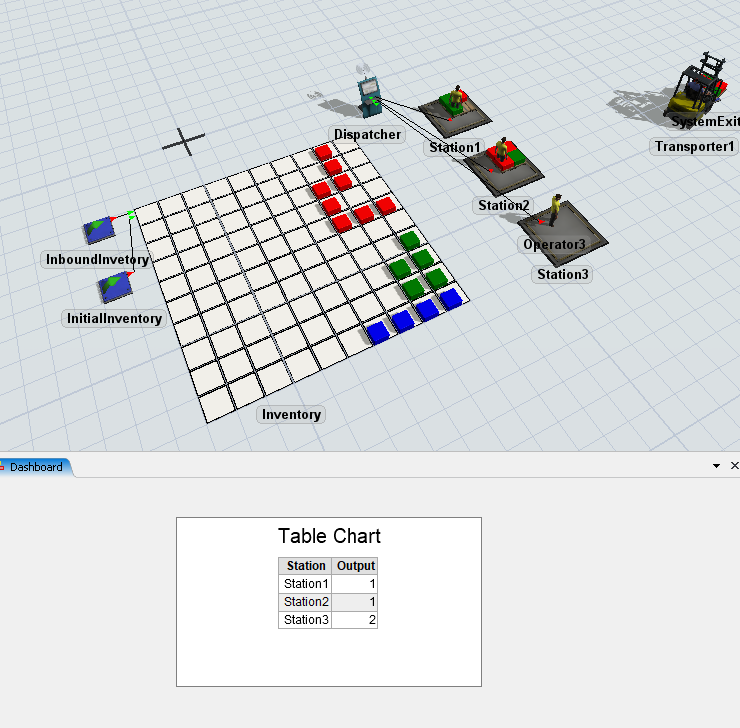
完成本教程后,您将获得一个新的统计收集器及图表,效果如下图所示。

步骤 1设置统计收集器

在此步骤中,您将创建并设置一个新的统计收集器。具体操作如下:

  1. 导航至屏幕左侧的工具箱选项卡。
  2. 点击按钮以创建新工具。进入统计选项区,选择统计收集器功能。此时应会为新统计收集器打开新的属性窗口。
  3. 点击属性窗口顶部的字段,将统计收集器重命名为StationOutput
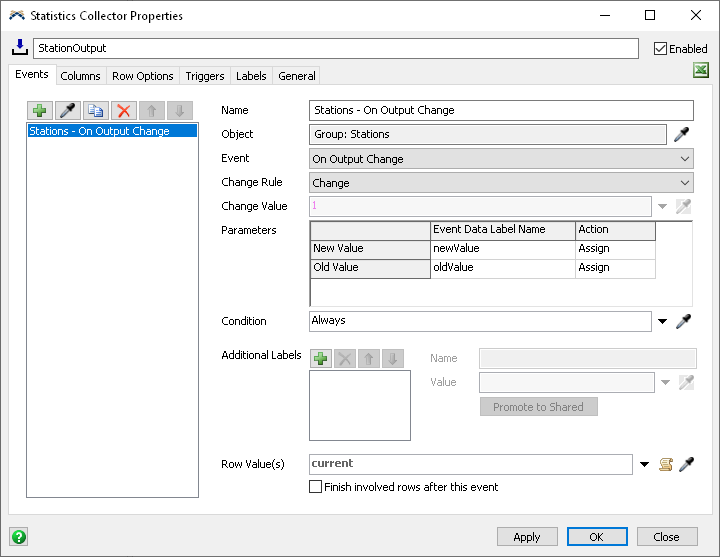
  4. 事件标签页中,点击采样器按钮,然后在3D视图中点击Station1。 指向站点选项,然后选择输出变化时在属性窗口中,点击
  5. 行值旁边的三角形,并选择事件对象(当前)导航到属性窗口中的
  6. 标签页,并点击按钮,向StationOutput收集器的表格添加新列。点击
  7. 名称框,并将该列重命名为站点Station.
  8. 行添加值框旁边,选择箭头以打开下拉列表选项。选择ID类别,然后选择行值ID选项。
  9. 点击按钮以添加新列。
  10. 点击名称框,将此列重命名为输出
  11. 点击行添加值框,并输入0。在这种情况下,我们希望添加行时 输出的值为0,但我们将在 事件值框中获取站点的实际输出。
  12. 点击事件值方框并键入数据新值
  13. 这将使用在输出变更时事件参数上创建的标签,该参数会查看事件触发时的新值。在这种情况下,新值指的是站点的输出。
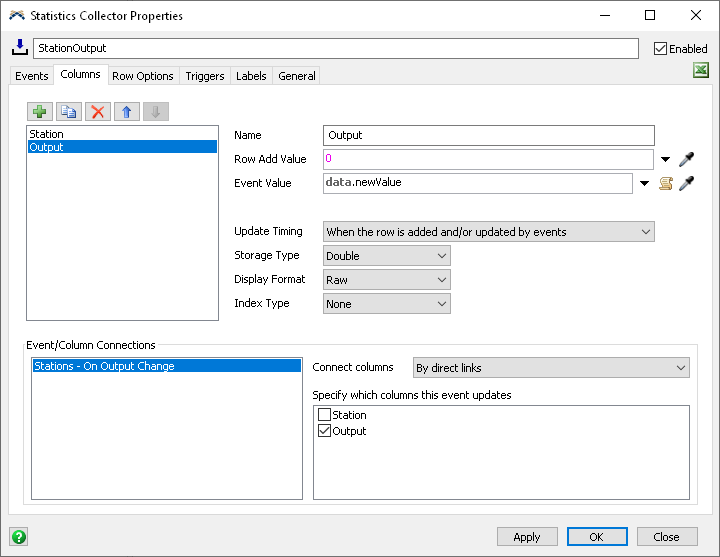
  14. 要建立列/事件连接,请点击事件/列连接字段中的站点 - 输出变更时选项,然后在标有指定此事件更新的列的字段中勾选输出
  15. 方框。最后,我们可以点击存储类型字段并选择整数
  16. 选项。应用按钮。

重置并运行模型。如果右键点击StationOutput收集器对象在您的工具箱标签页中,并选择查看表格
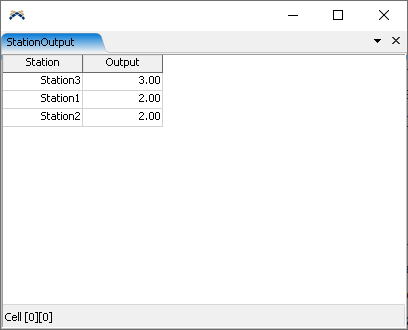
,您将能够看到统计收集器的表格为每个站点更新。

解释

监听一个组

统计收集器可以监听一组对象。如果组中的任何对象触发事件,统计收集器将响应该事件。在此任务中,您监听了 Stations 组中所有对象的 On Output Change 事件。这意味着如果任何站点触发其 On Output Change 事件,那么统计收集器将响应。

事件参数当您监听一个对象事件时,该事件可能带有参数。在此示例中,您监听了 On Output Change 事件,该事件有两个参数:输出统计的新值和旧值。这些参数被分配为实体。在此任务中,您使用了数据newValue用于输出列的值中。newValue是输出变更事件的参数,并在数据对象上被赋予标签。

使用current

在统计收集器中,关键字current指的是触发事件的对象。当任何站点触发其输出变更事件时,current将指代触发事件的站点。

连接事件与列

您可以将一个事件连接到一个或多个列。当事件触发并产生其行值时,统计收集器将确保存在该值的行。然后,对于每个连接的列,统计收集器将记录事件值在当前行的该列中。在此任务中,您已将“输出变化”事件连接到输出列。当某个站点的输出发生变化时,统计收集器将确保为该站点创建一行,然后将新的输出值写入输出列。

存储类型

统计收集器允许您控制每列所需的内存大小。在此任务中,您将存储类型设置为整数。这意味着该字段将只能存储整数值,但它所需的内存将少于双精度列。

步骤 2设置站点的显示顺序

目前,统计收集器会在每个站点的输出首次发生变化时为其添加一行。这意味着表格中的行顺序取决于模型的运行方式。

要解决此问题:

  1. 再次导航到统计收集器的属性窗口,并转到事件标签页。
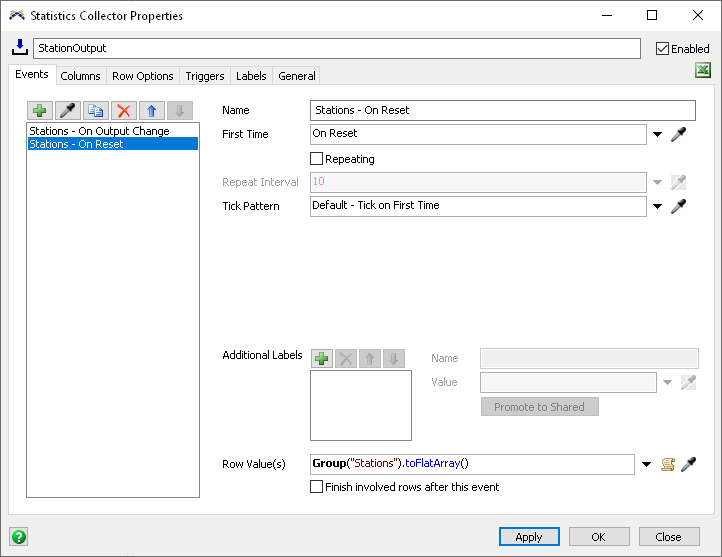
  2. 点击按钮以添加新事件,并选择创建重置事件选项。
  3. 点击名称框,将事件重命名为站点 - 重置时
  4. 点击行值框旁边的箭头,然后选择组的所有成员选项,接着选择站点组。
  5. 点击应用按钮。

如果现在重置并运行模型,您可以查看表格,应该会看到站点输出收集器的表格已正确排序了站点。
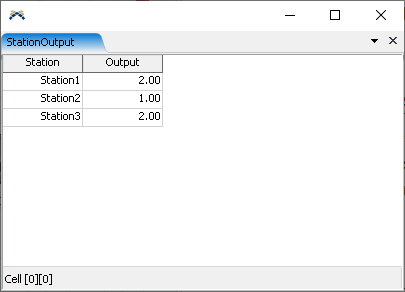
说明

当"站点-重置时"事件触发时,它会生成一个包含站点组中所有对象的数组。这些对象的顺序与组属性窗口中显示的顺序一致。随后,当"站点-输出变更"事件触发时,由于该站点对应的数据行已存在,统计收集器不会新增数据行。但该事件已关联至输出列,因此该站点对应行的输出列将被更新。

步骤3在仪表板中添加表格图表

接下来我们将在仪表板中添加一个简单的表格来展示输出数据。完成后,表格应呈现如下样式。
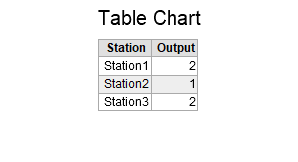
创建图表的步骤如下:

  1. 点击屏幕顶部的仪表板按钮,并选择添加仪表板选项。
  2. 在右侧属性面板中,点击仪表板名称输入框。将仪表板重命名为站点输出
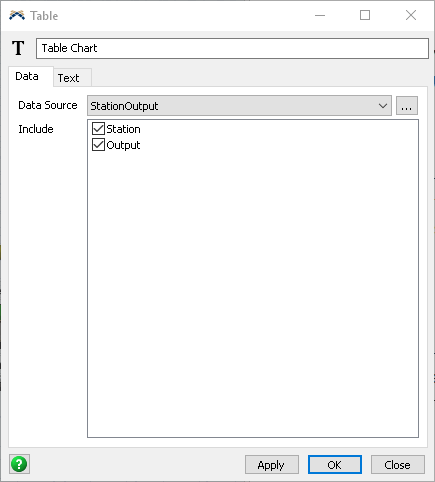
  3. 在仪表板视图处于激活状态时,浏览左侧资源库。找到对应选项表格图表基础图表类型类别下,将一个表格图表拖入仪表板窗口。这将创建一个新的空白图表,并打开其属性窗口。
  4. 在属性窗口中,点击数据源字段,并从选项中选择StationOutput收集器。
  5. 包含字段中,确保已勾选StationOutput复选框。

如果您重置并运行模型,现在可以看到表格图表将跟踪站点输出。您可能需要以更高的速度运行模型才能看到这一变化。

在下一个任务中,我们将使用统计收集器来显示站点内容随时间的变化。

______
icon-svg-close-thick

Cookie preferences

Your privacy is important to us and so is an optimal experience. To help us customize information and build applications, we collect data about your use of this site.

May we collect and use your data?

Learn more about the Third Party Services we use and our Privacy Statement.

Strictly necessary – required for our site to work and to provide services to you

These cookies allow us to record your preferences or login information, respond to your requests or fulfill items in your shopping cart.

Improve your experience – allows us to show you what is relevant to you

These cookies enable us to provide enhanced functionality and personalization. They may be set by us or by third party providers whose services we use to deliver information and experiences tailored to you. If you do not allow these cookies, some or all of these services may not be available for you.

Customize your advertising – permits us to offer targeted advertising to you

These cookies collect data about you based on your activities and interests in order to show you relevant ads and to track effectiveness. By collecting this data, the ads you see will be more tailored to your interests. If you do not allow these cookies, you will experience less targeted advertising.

icon-svg-close-thick

THIRD PARTY SERVICES

Learn more about the Third-Party Services we use in each category, and how we use the data we collect from you online.

icon-svg-hide-thick

icon-svg-show-thick

Strictly necessary – required for our site to work and to provide services to you

Qualtrics
W
Akamai mPulse
W
Digital River
W
Dynatrace
W
Khoros
W
Launch Darkly
W
New Relic
W
Salesforce Live Agent
W
Wistia
W
Tealium
W
Upsellit
W
CJ Affiliates
W
Commission Factory
W
Google Analytics (Strictly Necessary)
W
Typepad Stats
W
Geo Targetly
W
SpeedCurve
W
Qualified
#

icon-svg-hide-thick

icon-svg-show-thick

Improve your experience – allows us to show you what is relevant to you

Google Optimize
W
ClickTale
W
OneSignal
W
Optimizely
W
Amplitude
W
Snowplow
W
UserVoice
W
Clearbit
#
YouTube
#

icon-svg-hide-thick

icon-svg-show-thick

Customize your advertising – permits us to offer targeted advertising to you

Adobe Analytics
W
Google Analytics (Web Analytics)
W
AdWords
W
Marketo
W
Doubleclick
W
HubSpot
W
Twitter
W
Facebook
W
LinkedIn
W
Yahoo! Japan
W
Naver
W
Quantcast
W
Call Tracking
W
Wunderkind
W
ADC Media
W
AgrantSEM
W
Bidtellect
W
Bing
W
G2Crowd
W
NMPI Display
W
VK
W
Adobe Target
W
Google Analytics (Advertising)
W
Trendkite
W
Hotjar
W
6 Sense
W
Terminus
W
StackAdapt
W
The Trade Desk
W
RollWorks
W

Are you sure you want a less customized experience?

We can access your data only if you select "yes" for the categories on the previous screen. This lets us tailor our marketing so that it's more relevant for you. You can change your settings at any time by visiting our privacy statement

Your experience. Your choice.

We care about your privacy. The data we collect helps us understand how you use our products, what information you might be interested in, and what we can improve to make your engagement with Autodesk more rewarding.

May we collect and use your data to tailor your experience?

Explore the benefits of a customized experience by managing your privacy settings for this site or visit our Privacy Statement to learn more about your options.
免责申明
部分文章来自各大搜索引擎,如有侵权,请与我联系删除。
打赏

文章底部电脑广告
手机广告位-内容正文底部

相关文章

上网淘巴领天猫淘宝优惠券,一年省好几千。

广告  ×

您是本站第1124461名访客 今日有0篇新文章/评论