As with the original addon, you can add grasping and releasing functionalities to any component. This updated grasp wizard can trigger the grasping signal automatically based on collisions and servo motions. The grasping logic has also been updated for new functionalities like Process Modeling assemblies.
Usage
Connect and send a True signal to GraspSignal for grasping and a False for releasing. Check TCPFrameLocation and DetectionVolumeSize if components are not picked up. Grasped components are attached (and following) the Node/Link given when applying the wizard. Additionally, you can select a servo joint that will trigger the GraspSignal automatically when the servo moves or changes direction past the threshold.
13.06.24 Update: Small improvements and bug fixes. 22.09.25 Update: Fixed an issue with the default detection volume size. 16.10.2025 Update: Fixed Path folder handling for foreign letters.
Installation Requires access to Modeling tab (ProfessionalorPremiumlicense) Download the addon package:
Like usual: Unzip the file to your “My Commands” and re-launch. E.g C:\Users%username%\Documents\visual Components\4.8\My Commands or C:\Users%username%\Documents\Visual Components\4.10\My Commands\Python 2\
Hello Esta, A few days ago i installed the grasp Wizard 2. after assinging the true signal it did work. After saving the program and reopening it, i get two messages and can’t get the grasp function to work again.
Looks like you have renamed the signal name. You can modify the Grasp script around lines 680 to use the new behavior names and then it should work again.
Hello everyone, I’ve been using the default Grab Wizard so far. The expert version is more utilized, so I’m going to try using it as the appropriate Add-on. Unlike the Grab Wizard I used before, many function have been added, so are there any manuals or instructions on what each function means and how to use it?
hello@Este Is there a way to change and fix the “DetectionVolumeSize”? For example, if I change the DetectionVolumeSize to X:70 Y:40 Z:20 during simulation, it works with the modified values. However, after saving the file and reopening it, the DetectionVolumeSize returns to its default value of X:5 Y:5 Z:5.
@Este Hello, I’ve been using the Wizard you created and it has been very helpful. Thank you. However, I’ve encountered an issue while using it, so I’d like to ask for your advice.
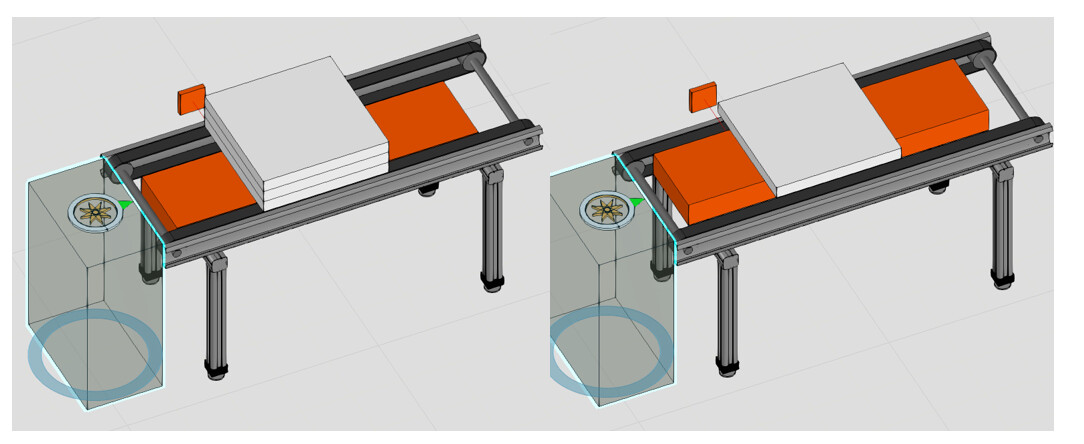
When I run the sample project“Grasp Wizar2_Error”, the Feeder produces a Block Geo stacked in three layers. But as soon as the Grasp Signal turns ON and it tries to grasp the three-layer Block Geo, it changes from three layers to a single layer, and the Block Geo is destroyed.
The Block Geo was created as an Assembly in[Process] - [Product] - [Product Type Editor].
This issue did not occur in the previous version,Grasp Wizard1. Grasp Wizar2_Error.vcmx(232.2 KB)
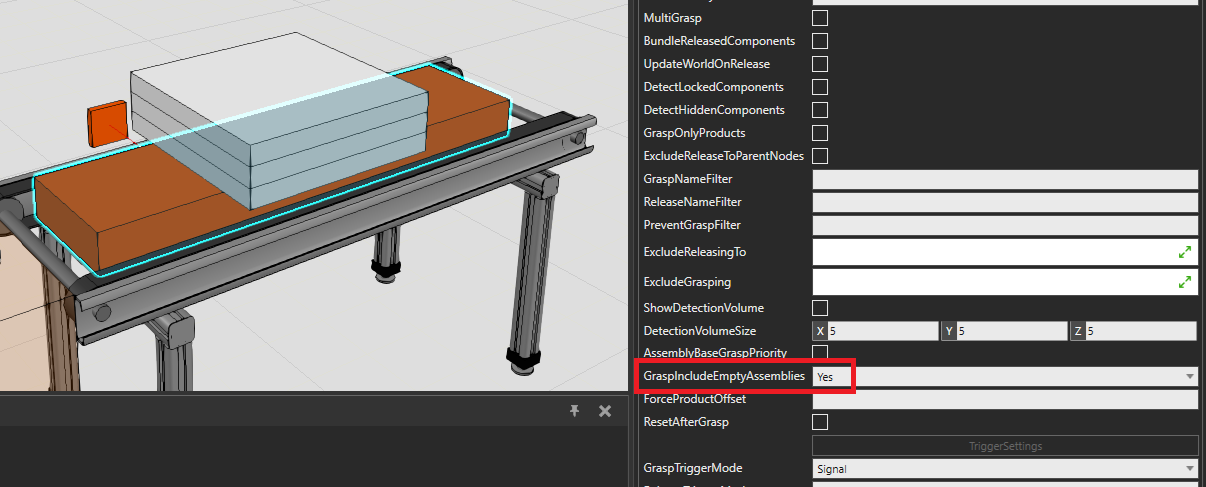
Hello@LEEYONGKOOK, Set GraspIncludeEmptyAssemblies as “Yes”. In the layout, the grasping mechanism forcibly grabs the only product in Step#1out from the assembly, so steps under Step#1were deleted. By using GraspIncludeEmptyAssemblies = “Yes”, the mechanism grasps the entire assembly instead of just the one part it detects.
I know you’ve been using this edon well, and I’ve carried out a reinstallation of the edon while updating to the latest version of VC 4.10. As I tried to use it after proceeding with the reinstallation, an error occurred as shown in the attached picture. I don’t think I can read the path name because the path contains Korean, do you know how to solve the problem?
Ok there is a problem with handling foreign characters in the addon folder path. I made some changes. Please download the new version and test if it works now.
I’m having a problem where, when I duplicate a component using the “Pattern” feature and then grab it with the GraspTool, it never grabs a single object, but always two – even though MultiGrasp is disabled. Do you have any ideas about this?
Aside from that, I’m very happy with the add-on. Very nice work.










 微信扫一扫,打赏作者吧~
网友评论
最新评论