要实现在 HMI 按钮按下时,根据零件属性(ID 为 1 或 2)改变其颜色为绿色或红色,你可以通过以下步骤实现: ### 步骤说明: 1. **设置零件属性**:为每个零件添加一个自定义属性(例如 `ColorID`),并在仿真前手动设置为 1(绿色)或 2(红色)。 2. **使用信号触发**:将 HMI 按钮与一个信号(如 `ButtonPressed`)关联,当按钮按下时改变信号值。 3. **编写 Python 脚本**:使用 `OnSignal` 事件监听信号变化,当信号改变时,遍历所有零件,根据其 `ColorID` 属性更改颜色。 ### Python 脚本示例: ```python import logic def OnSignal(signal): # 当信号变化时执行 if signal.name == "ButtonPressed" and signal.value == 1: # 假设信号值为1表示按钮按下 # 获取场景中所有零件 parts = logic.getAllObjects() for part in parts: # 检查零件是否有 ColorID 属性 if hasattr(part, "ColorID"): color_id = part.ColorID if color_id == 1: # 设置为绿色 part.material.diffuseColor = (0, 1, 0) # RGB 值 elif color_id == 2: # 设置为红色 part.material.diffuseColor = (1, 0, 0) # RGB 值 else: # 默认保持黄铜色 (RGB 近似值) part.material.diffuseColor = (0.71, 0.65, 0.26) # 可选:信号重置时恢复原色(根据需求调整) elif signal.name == "ButtonPressed" and signal.value == 0: for part in logic.getAllObjects(): if hasattr(part, "ColorID"): part.material.diffuseColor = (0.71, 0.65, 0.26) # 恢复黄铜色 ``` ### 配置步骤: 1. **在仿真软件中**(如 Blender、Unity 等): - 为每个零件添加 `ColorID` 属性(整数类型,值为 1 或 2)。 - 创建一个信号(例如 `ButtonPressed`),并关联到 HMI 按钮。 - 将上述 Python 脚本附加到场景中的控制器或相关对象上,并确保脚本监听 `ButtonPressed` 信号。 2. **信号连接**: - 在仿真软件的事件/信号配置界面,将 `ButtonPressed` 信号连接到 Python 脚本的 `OnSignal` 函数(具体方法取决于软件,参考截图中的连接方式)。 ### 注意事项: - 颜色值(RGB)可能需要根据仿真软件的材质系统调整。 - 确保零件对象的 `material` 属性可访问,且支持动态修改颜色。 - 如果零件数量较多,考虑优化遍历逻辑,例如只处理特定标签或分组的零件。 通过以上设置,当 HMI 按钮按下时,所有带有 `ColorID` 属性的零件将根据其 ID 值切换为绿色或红色,否则保持黄铜色。

Hi all,

How would the python script for part look look if I wanted the material of a part to change colour to either green or red once a HMI Button is pressed. The original colour would be brass and each part as a property has the ID 1 (for green) or 2 (for red), which has to be manually inputted before the simulation and changes to the corresponding colour once the button is pressed.

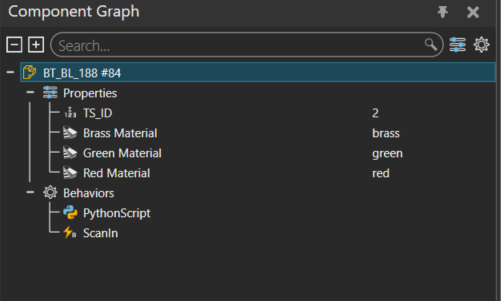
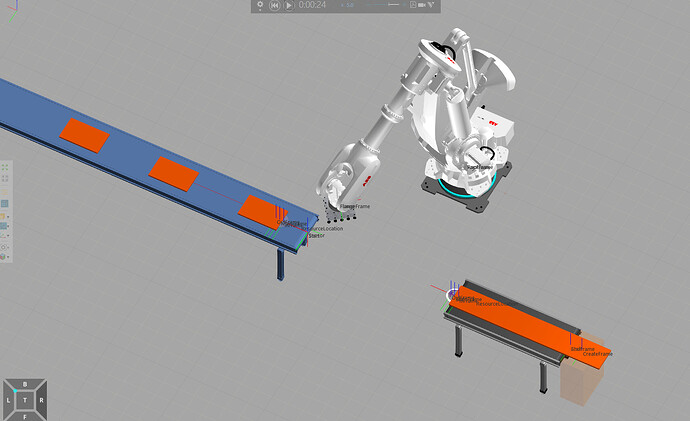
This is how my python scripts look for the part looks (currently trying for one part). the part is brass when the simulation starts but stays brass when the button is pressed:
Part:

image

image501×301 25.7 KB

from vcScript import *

comp = getComponent()

def apply_material_recursive(node, material):
    node.MaterialInheritance = VC_MATERIAL_FORCE_INHERIT
    node.NodeMaterial = material
    for child in node.Children:
        apply_material_recursive(child, material)

def set_self_material(material):
    if material is None:
        return 
    apply_material_recursive(comp, material)


ts_id_prop = comp.getProperty("TS_ID")            # Integer: 1=green, 2=red (set manually)
brass_prop = comp.getProperty("Brass Material")   # Ref<Material>
green_prop = comp.getProperty("Green Material")   # Ref<Material>
red_prop   = comp.getProperty("Red Material")     # Ref<Material>

def set_brass():
    set_self_material(brass_prop.Value)

def reveal_color():
    ts_id = ts_id_prop.Value
    if ts_id == 1:
        set_self_material(green_prop.Value)
    elif ts_id == 2:
        set_self_material(red_prop.Value)
    else:
        set_brass()

def OnReset():
    set_brass()

def OnStart():
    set_brass()

def on_scan(signal):
    
    if signal.Value:
        reveal_color()

scan_in = comp.findBehaviour("ScanIn")  # Boolean Signal on the TS
if scan_in:
    scan_in.OnValueChange = on_scan

# Initial state
set_brass()

Thanks in advance!

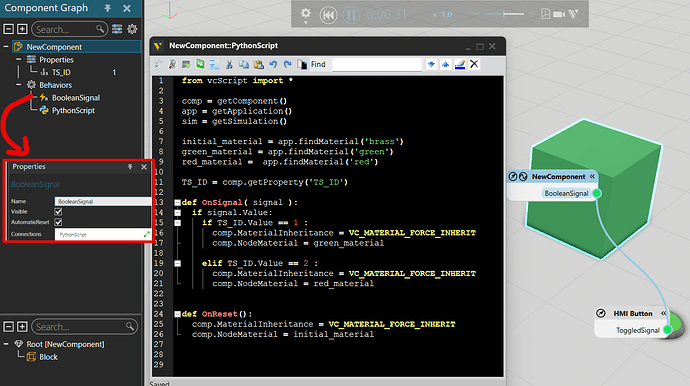
It would be better to useOnSignalto trigger the script when the signal changes.

Don’t forget to add the connection between the Signal and the PythonScript (see the screenshot)

1 Like

Thank you for the response. I was wondering if the same could be done when the ray from the colour Sensor makes contact with the block. So the colour of the block only changes when the ray makes contact instead of using the button?

Thanks in advance

Color Sensor.vcmx(17.4 KB)